How to connect a Meta Ads MCP to Claude
You point Claude at an MCP server that wraps Meta's Marketing API, then authorize your account. There are three ways to do it: Meta's official MCP, a self-hosted open-source server, or a managed connector like Adside. Here's each one, the exact config, and how to keep the connection safe.
Connecting Meta ads to Claude comes down to one idea: you give Claude an MCP server that speaks to Meta's Marketing API on your behalf, and you authorize which account it can touch. After that you're asking Claude "what's my CAC this week" or "pause anything under 2x ROAS" in plain language instead of clicking through Ads Manager. The whole thing takes a few minutes. The only real decision is which of three connectors you use, and that decision is mostly about how you'd rather handle authentication.
The short version
- Three routes. Meta's own official MCP (OAuth, one Meta account), a self-hosted open-source server (you manage the token), or a managed connector like Adside (OAuth, multiple accounts, Meta plus Google and LinkedIn).
- In claude.ai or Claude Desktop, you add it under Settings → Connectors → Add custom connector, paste the server URL, and authorize.
- In Claude Code it's one line:
claude mcp add --transport http meta-ads <url>. - Prefer OAuth over pasting a token. A long-lived personal token in a config file is the thing that leaks.
- Connecting is the easy part. Connecting safely, read-only first with a human on writes, is the part that actually matters.
The three ways to connect
Every route ends the same way, with Claude able to call Meta's API, but they differ in who holds the token and how much they cover. As of mid-2026 Meta ships its own official MCP, which changed the default: the safest option is now a first-party one.
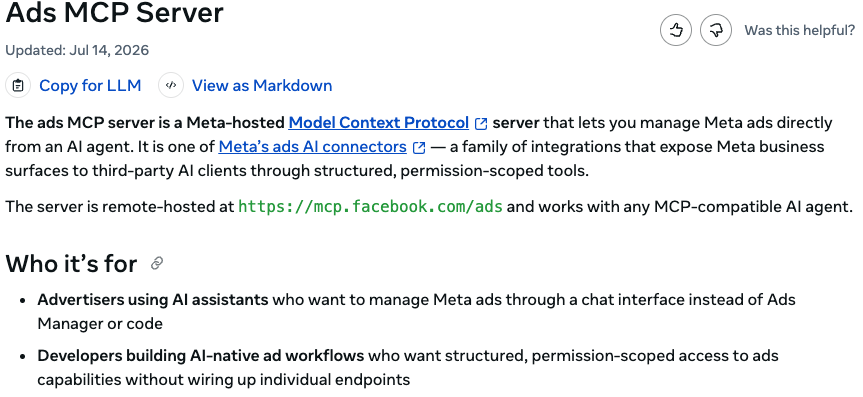
mcp.facebook.com/ads and works with any MCP-compatible assistant. It authenticates with a single Meta Business OAuth prompt, so you never handle a token. developers.facebook.com| Route | Auth | Covers | Best for |
|---|---|---|---|
| Meta's official MCP | OAuth, no token to handle¹ | One Meta account | A single account, managed by hand |
| Open-source, self-hosted | You supply a token | One account per token | Developers who want full control |
| Managed (Adside) | OAuth, provider holds it | Meta, Google, LinkedIn; many accounts | Agencies and anyone running more than one account |
Whichever you pick, the step inside Claude is nearly identical. Here's what it looks like in each client.
In claude.ai or Claude Desktop
Both the web app and the desktop app use the same Connectors interface for remote MCP servers. Open Settings → Connectors, click Add, and choose Add custom connector.
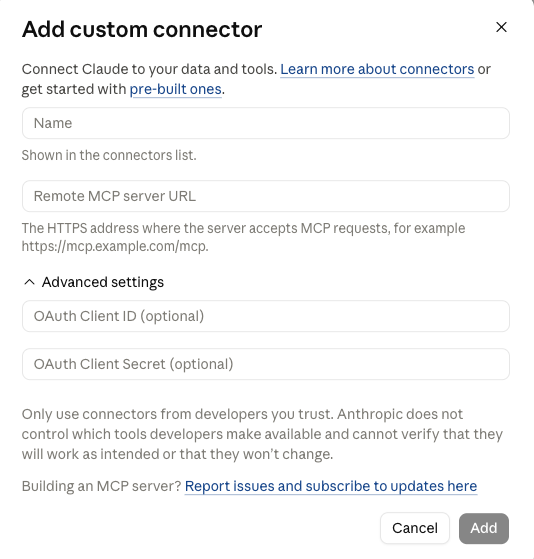
https://mcp.facebook.com/ads), give it a name, and click Add. Claude runs the OAuth flow for you.Paste the server URL, give the connector a name, and add it. If the server uses OAuth (Meta's official one and Adside both do), Claude opens the sign-in flow, you approve access to your Meta account, and that's it. The connector then shows up in your list, connected and ready:
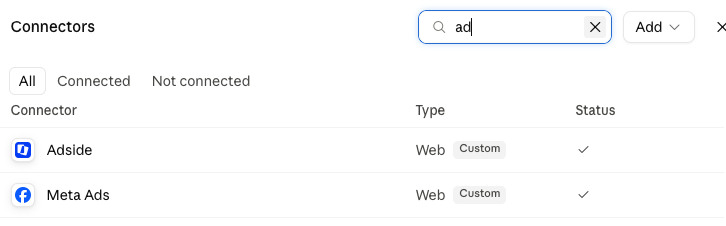
One thing worth knowing: the Connectors UI is the right home for remote servers (a URL Claude talks to over HTTPS). A local server that runs on your own machine is added differently, as a command entry in the config file, which is the same shape Claude Code uses below.
In Claude Code
From the terminal it's a single command. For a remote server like Meta's official MCP:
Claude Code registers the server and, the first time it needs access, walks you through the OAuth sign-in. To scope the connection to just this project instead of your whole machine, add -s project. You can confirm it landed with claude mcp list, and from then on Claude Code can call the Meta tools in any session in that directory.
A self-hosted, open-source server runs locally instead, so you register it as a stdio command and hand it a token through an environment variable:
That works, but notice what it requires: a Meta access token sitting in your shell config. Use a System User token scoped to the one account, never your personal login, and keep it out of anything you'd screen-share. Open-source Meta MCP servers have already shipped critical bugs that leaked the operator's token,³ so if you don't want to own that risk, the OAuth routes exist precisely to avoid it.
The managed route: Adside
The two screenshots above showed Adside sitting in the connector list next to Meta Ads, because Adside is the managed version of this whole setup. You connect Meta once through OAuth in the Adside app, add the Adside connector to Claude the same way you'd add any remote server, and you're done. No token in a file, and the app hands you the exact URL to paste so there's nothing to guess.
The reason to use it over the raw official MCP comes down to three things. First, coverage: one connection covers Meta, Google and LinkedIn, and lets you point Claude at any of the accounts you manage, which is the normal case the moment you run more than one brand. Second, safety on your behalf: requests route through Adside's API layer, which paces calls to stay inside Meta's rate limits and backs off when they climb, instead of an agent hitting Meta directly and hammering it into an abuse flag.² Third, control on writes: it stays read-first, and changes that spend money are surfaced for you to approve before they go live. It works with Claude Code, OpenClaw, Gemini, ChatGPT, or any MCP-compatible assistant, and MCP access is included in the standard plan.
If you're connecting one Meta account you'll manage by hand, Meta's official MCP is genuinely fine. The moment it's several accounts, several platforms, or an agent you want running unattended, a managed connector is the difference between "it works" and "it works and won't get you flagged."
Verify it works
Once the connector is green, test it with a read, not a write. A read can't spend a dollar or change anything, so it's the safe way to confirm the wiring: ask Claude something it can only answer by calling Meta.
If Claude comes back with real numbers from your account, you're connected. Good next reads are the ones that are genuinely useful and carry no risk: "which campaigns have rising CPA and falling CTR this week," or "build me a cross-platform performance summary for the last 30 days." Keep it to reads until you trust the setup, then decide, deliberately, whether to hand it write access.
Connect it without getting banned
The connection is easy. The part that trips people up is what they let the agent do next. The Marketing API is the sanctioned way to manage ads, so an MCP built on it won't get you banned on its own, but an unsupervised agent writing to your account from a raw token, in bursts, with errors, and no human looking, absolutely can.² Two habits keep you clear of it:
- Read-only until you trust it. Meta scores every call, and a read costs a third of what a write does, so a read-only agent is both safer and lighter. Let it pull data and draft changes before it ever makes one.
- A human on every write. The agent proposes the budget shift or the pause; a person approves anything that actually spends money or edits a live campaign.
That's the short version of a longer piece worth reading before you give any connector write access: can a Meta Ads MCP get your account banned? It walks through exactly what Meta's abuse systems watch for, and the setup that stays on the right side of it. Adside's connector does that work for you; if you wire one up yourself, do it by hand.
Frequently asked questions
How do I connect a Meta Ads MCP to Claude?
You point Claude at an MCP server that wraps Meta's Marketing API, then authorize your Meta account. In claude.ai or Claude Desktop, open Settings, go to Connectors, choose Add custom connector, paste the remote MCP server URL, and complete the OAuth prompt. In Claude Code it is one command: claude mcp add --transport http meta-ads https://your-mcp-server. Once it is added, Claude can read your campaigns and, if you allow writes, manage them in plain language.
Does a Meta Ads MCP work with Claude Desktop, Claude Code, and claude.ai?
Yes, all three, plus any other MCP-compatible assistant like Cursor, Gemini or ChatGPT. Remote MCP servers are added through the Connectors interface in claude.ai and Claude Desktop, and with the claude mcp add command in Claude Code. A local, self-hosted server is added as a stdio entry in your config file instead. The Meta account you authorize is the same either way; only the client differs.
Should I use Meta's official MCP or a third-party one?
For a single Meta account, Meta's official MCP is a solid default: it is hosted at mcp.facebook.com/ads, uses OAuth so you never handle a token, and anything it creates lands paused. A self-hosted open-source server gives you more control but makes you responsible for the access token and for keeping the package patched, which has already caused token leaks. A managed connector like Adside uses OAuth like the official one but adds multiple ad accounts, Meta plus Google and LinkedIn from one setup, and pacing that keeps calls inside Meta's rate limits.
Do I need a Meta developer app or an access token?
It depends on the route. With Meta's official MCP or a managed connector, no: you sign in with OAuth and the provider handles the token. With a self-hosted open-source server, yes: you generate a System User token in Meta Business Manager, scope it to the specific ad accounts, and store it server-side. Never paste a long-lived personal token into a config file, because that is how tokens leak.
Can I connect several ad accounts, and Google or LinkedIn too?
Meta's official MCP is Meta-only, and most open-source servers connect one account per configured token. If you run several accounts or several platforms, a managed connector is simpler: Adside connects Meta, Google and LinkedIn from one setup and lets you point Claude at any account you manage, which is the common case for agencies and for anyone running more than one brand.
Will connecting an MCP get my Meta ad account banned?
Not by itself. Meta has no rule against connecting an AI tool, and the Marketing API is the sanctioned way to manage ads. Accounts get flagged for the pattern of calls an unsupervised agent makes: bursts of requests, high error rates, budget changes fired faster than a human would, and unreviewed writes from a raw token. Keep the agent read-only by default, put a human on every write, and authorize with OAuth or a scoped System User token, and connecting is safe. There's a full breakdown here.
Sources
- Official Meta ads MCP server, OAuth auth, hosted at mcp.facebook.com/ads — Ads MCP Server, Meta for Developers (accessed Aug 2026)
- What triggers a Meta ad account disable, and the safe setup — Can a Meta Ads MCP get your account banned?, Adside
- Operator token leak in a self-hosted Meta Ads MCP — CVE-2026-48039, GitHub Advisory Database (published May 2026)
- Meta's ads MCP server opens to all developers — Meta for Developers blog, July 2026